实验三、图像大模型微调
1、下载素材
在校园网下载素材包。
Note
为了隔离和系统的环境,操作上和正常版本稍有不用。为了节省出更多的时间用于练习,绿色版已经提前安装好了各种软件包,故以下备注的命令行不用操作
2、标注图像(灰色注释部分不用操作)
# set PYTHONNOUSERSITE=1
#a、安装labelimg
# python -I -m pip install labelimg -i https://pypi.tuna.tsinghua.edu.cn/simple --trusted-host pypi.tuna.tsinghua.edu.cn

#b、启动labelimg
labelimg
00_data_for_label,将VOC模式切换为YOLO模式后开始标注,该示例比较简单,只有一种标签pig 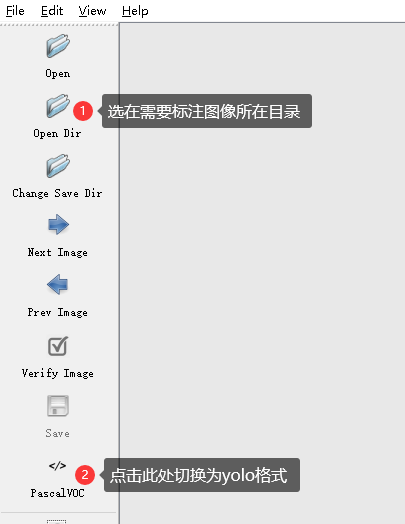
3、训练模型
set PYTHONNOUSERSITE=1
#a、安装YOLO
python -I -m pip install ultralytics -i https://pypi.tuna.tsinghua.edu.cn/simple --trusted-host pypi.tuna.tsinghua.edu.cn


#b、开始训练
python train.py

##因为和task1共享了环境,如果报numpy错误用以下命令重装即可
python -I -m pip install numpy pandas --force-reinstall --no-cache-dir -i https://pypi.tuna.tsinghua.edu.cn/simple --trusted-host pypi.tuna.tsinghua.edu.cn
4、基于大模型的预标注
采用上一步训练的模型best.pt对新的图片完成预标注
python pre_label.py
5、实现实时追踪
采用上一步训练的模型best.pt实现最视频的实时追踪
python track.py
本站总访问量 次
Authors: